Shopify app · for stores in India
GST invoices from your Shopify orders
Invoices and credit notes with the right tax on every line, numbered in order for the financial year. Free, with bulk tools at $10 a month.

GST
Made for how India bills.
The details generic invoicing apps get wrong, worked out from your settings and each order.
- CGST + SGSTWhen the order ships within your state
- IGSTWhen it ships to any other state
- HSN slabsThe rate can change with the price
- FY numberingINV/0001/26-27, then /27-28 next year
- Credit notesMade when an order is cancelled
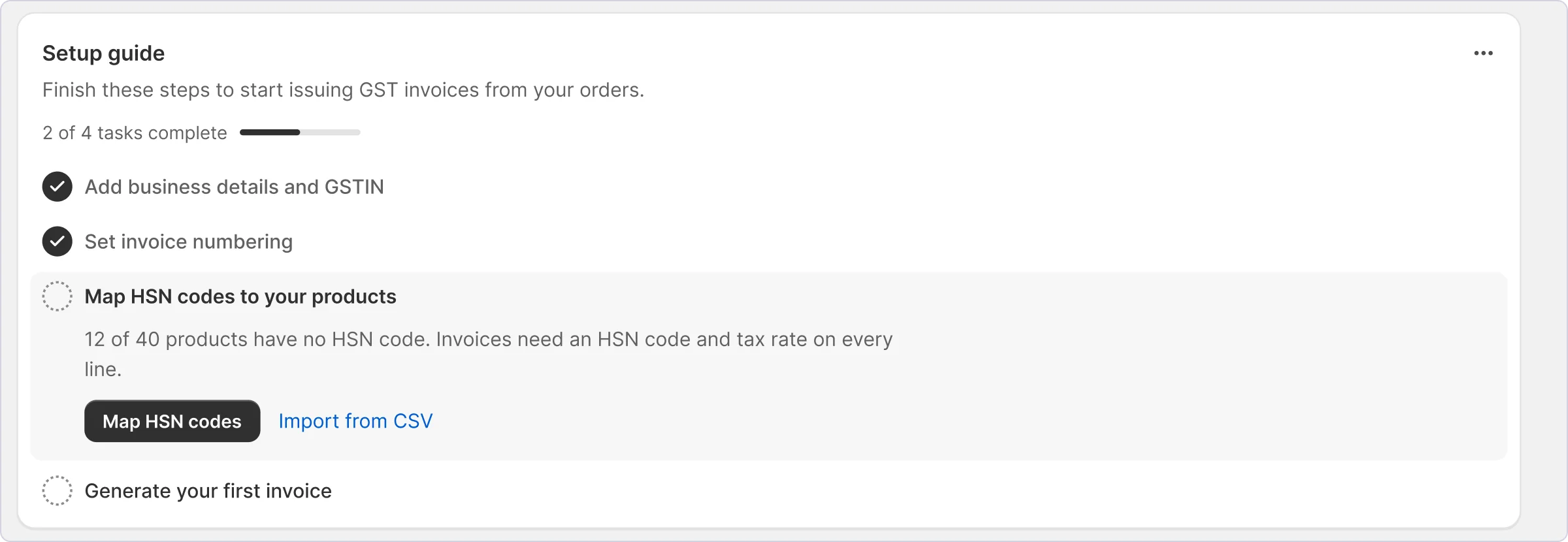
Setup guide
Set up in four steps.
The dashboard walks you through them and ticks each one off as you go.
- 01
Business details and GSTIN
Your legal name, GSTIN, PAN, address and state, in Settings. They print on every invoice, and your state decides CGST and SGST or IGST.
- 02
Numbering
A prefix, suffix and next number for invoices, and again for credit notes. INV/ and /26-27 give INV/0001/26-27. Change the suffix when the year turns.
- 03
HSN codes
Add the codes you sell under with their rates, or import a CSV, then give each product its code. A line without one is taxed at 18%.
- 04
Your first invoice
Mark an order Ready to dispatch and generate its invoice. Change its number or date later and the PDF is made again.
Credit notes
Cancel in Shopify. The credit note is done.
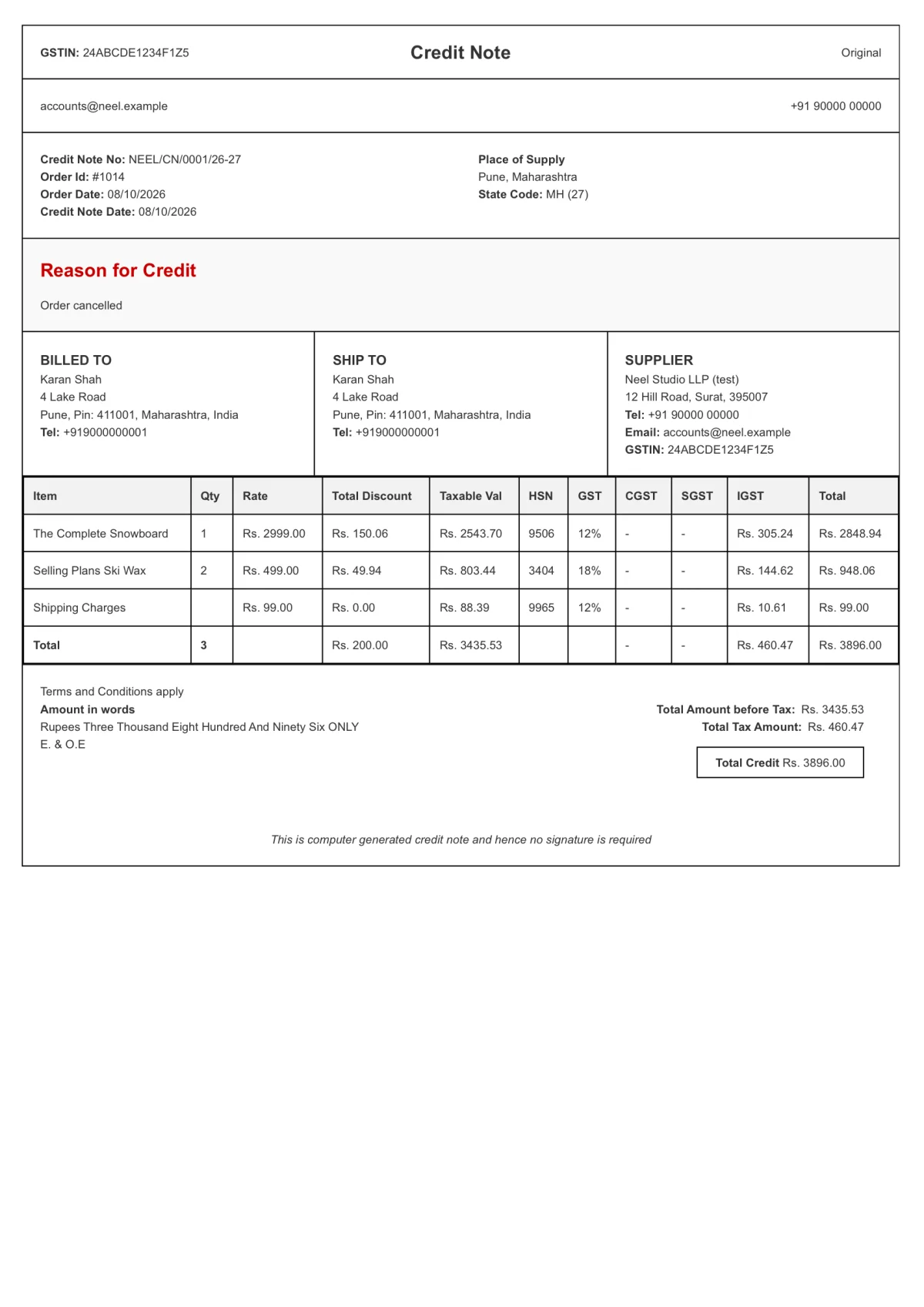
When an order is cancelled in Shopify, its credit note is made straight away, matching the invoice line for line: the same items, HSN codes, rates and totals.
- Its own series, like NEEL/CN/0001/26-27, separate from invoices
- Or make one yourself from the order
- The reason for the credit is printed on it
Reports
GST reports for your CA.
| Order | Invoice | State | Taxable | CGST | SGST | IGST |
|---|---|---|---|---|---|---|
| #1013 | NEEL/0001/26-27 | Gujarat | 3,435.54 | 230.23 | 230.23 | – |
| #1014 | NEEL/0002/26-27 | Maharashtra | 3,435.53 | – | – | 460.47 |
| Total | 6,871.07 | 230.23 | 230.23 | 460.47 |
Reports makes an Excel file of your orders for any dates and order status, with the taxable value, CGST, SGST and IGST for each one, ready to share with your CA.
- Invoice number, date, state and HSN codes for every order
- Credit notes in the same report
- Past reports stay in Report history
Pricing
Free for every order. Pay for bulk.
Free
$0forever
Every feature, one order at a time. No limit on orders. Support isn’t included.
- GST invoices for every order
- Credit notes, made when an order is cancelled
- HSN codes with tax slabs
- Branded invoice PDFs
- Excel reports and CSV export
Bulk
$10a month
For stores with lots of orders. 14 days free, then billed by Shopify with your store’s bill.
- Everything in Free
- Invoices for many orders at once
- Credit notes in bulk
- CSV import of invoice numbers
- Email support within 24 hours
FAQ
Questions merchants ask.
- Is it really free?
- Yes. Every feature is free, one order at a time, with no limit on how many orders. You only pay if you want bulk tools.
- What do I get for $10 a month?
- Invoices and credit notes for many orders at once, CSV import, and email support. It starts with a 14-day free trial, and you can go back to Free any time.
- Which orders does it show?
- Orders from the date you set in Settings onwards. Sync orders pulls in anything new from Shopify.
- Can I import my HSN list?
- Yes, from a CSV: the code, a description and its rate, or rate slabs by price.
- Do I need a webhook for cancellations?
- No. Shopify tells the app directly. If you made an “Order cancellation” webhook for this app before, delete it.
- What happens when I uninstall?
- The app deletes your store’s orders, invoices, credit notes, reports and settings straight away. Download anything you need first. The privacy policy has the rest.
- How do I get help?
- On the Bulk plan, write to [email protected] with your store’s myshopify.com address. I reply within 24 hours. Support isn’t included on Free; the setup steps and these answers cover most questions.
Try it on your store
Free to install and use. Questions first? Write to [email protected], I reply within 24 hours.
Install on Shopify