Article · Vogue Shots · Sep 2026
A receipt photobooth, in 4 days
Guests take their photos, and seconds later tear off a strip that looks like a receipt from the event. Designed in the admin, printed on a thermal printer, running offline all day.
Where it started
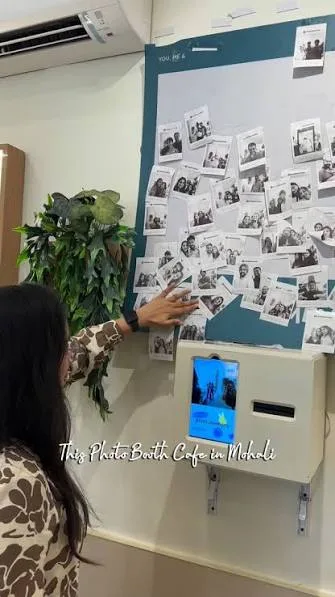
A wall of receipt strips at Got Tea, a Korea-inspired café in Delhi.
Photo: Got Tea, via Instagram.
The idea
Photo strips are everywhere at events. A receipt is not. It’s cheap to print, instantly recognisable, and people keep them.
Vogue Shots wanted it branded for every event, without a developer on site.
Where the idea came from
We saw a receipt photobooth at Got Tea, a café in Delhi, and couldn’t stop thinking about it. Guests queued for it, kept the strip, and pinned it to the wall. Vogue Shots wanted that feeling at every event, branded for each one.
Photo and idea: Got Tea, Mohali · instagram.com/reel/DP0SVJ8D1yK
How it works
The event team designs it
In the Vogue Shots admin: how many photos, the layout, a frame, header, logo and footer text. Export it as one file.
Import it once
On the tablet, open the hidden staff screen and import the design. From then on the booth runs offline, and remembers the design after a restart.
Guests tap Start
A countdown, a flash, repeat. The receipt is built, previewed and printed before they’ve put their phones away.
Staff stay in control
Press and hold to open settings: printer, front or back camera, countdown length, auto-print.
A native Android app
Written in Kotlin, so it talks straight to the receipt printer over USB, drives the camera itself and runs all day without the internet.
Why it works on the day
The admin preview and the printed receipt follow the same layout rules, so what the team designs is exactly what prints. No surprises in front of guests.
Once a design is imported, the booth needs no internet and remembers everything after a restart. Staff can swap cameras, change the countdown or reprint without calling anyone.
The four days
23 Sep
Printer talking to the tablet
24–27 Sep
Receipt designer in the admin, one shared layout
28 Sep
Photobooth mode, guest and staff screens
Next event
Runs offline, all day
Credits
- Lead, photobooth and receipt designer
- Anshul Laikar
- Printer app
- Ethan Vaz
- Built with
- Kotlin, Android
- Kit
- Epson TM-T82X-II, 80 mm paper
Next